

We have all been there: you find the perfect YouTube video—a cooking tutorial, an indie music track, or an educational guide—and you want to save it to watch offline. Naturally, a quick search leads you to Y2Mate, one of the oldest and most popular free video downloaders on the web.
But as you hover your mouse over the download button, a barrage of sketchy pop-ups and random redirects fills your screen. Your antivirus starts screaming, and you find yourself asking: Is Y2Mate safe in 2026?
The short answer is no, Y2Mate is not completely safe. While the core conversion tool does technically work, the aggressive advertising networks powering the site pose major security risks to your device.
In this comprehensive, honest guide, we will break down exactly how Y2Mate operates in 2026, the specific risks it carries, and how you can protect your device if you absolutely must use it.
What is Y2Mate and How Does It Work?
Launched in late 2016, Y2Mate is a free web utility designed to download and convert videos from YouTube, Vimeo, and other hosting platforms into offline file formats like MP3 and MP4.
[YouTube Video URL] ➔ [Y2Mate Converter] ➔ [Pop-up Ads / Redirects] ➔ [Your Downloaded File]
The site is entirely free because it does not charge users directly. Instead, it monetizes its massive traffic through third-party ad networks. This business model is precisely where the safety concerns begin.
Is Y2Mate Safe in 2026? The Real Security Risks
To give you a balanced answer: the Y2Mate converter tool itself is not a virus. However, the ecosystem surrounding the website is highly volatile. When you click “Download,” you aren’t just interacting with Y2Mate—you are interacting with rogue ad servers.
Here are the primary security threats users face on Y2Mate in 2026:
1. Malicious Pop-ups and Shady Redirects
The moment you click anywhere on the Y2Mate interface, a new browser tab or window likely opens. These redirects frequently lead to:
- Phishing Sites: Fake login screens designed to steal your passwords or personal details.
- Tech Support Scams: High-pressure pages claiming “Your PC is infected with 5 viruses!” to trick you into purchasing useless software or giving hackers remote access.
- Adult Content: Highly inappropriate or explicit advertisements.
2. Potentially Unwanted Programs (PUPs) and Adware
Y2Mate pages often display fake “Download” buttons or suggest that you need to update your browser, Adobe Flash (which is obsolete!), or system drivers to proceed. If you accidentally click these, you may download a PUP (Potentially Unwanted Program) or adware that hijacks your browser settings, changes your search engine, and spams your desktop with ads.
3. Exploitative Push Notifications
When you land on Y2Mate, the site often prompts you to “Allow Notifications” to complete your download.
Never click “Allow.” If you do, the site gains permission to push malicious ads directly to your system tray or lock screen, even when your browser is completely closed.
4. Drive-By Downloads
In worst-case scenarios, merely visiting the page or clicking a deceptive element can trigger a drive-by download, where a malicious script attempts to run silently in the background and install malware on your system without your consent.
The Y2Mate Safety Matrix
| Threat Level | Risk Factor | What It Actually Does | How to Avoid It |
| Low | The Converter Tool | Extracts the audio/video file from the link. | Verify the file extension (e.g., .mp4, not .exe). |
| High | Deceptive Ads | Prompts fake system cleanups or player updates. | Use a robust ad blocker like uBlock Origin. |
| Critical | Push Notifications | Spams adware straight to your desktop. | Always click “Block” on notification prompts. |
| Medium | ISP/Legal Blocks | Accessing copyrighted content offline. | Use legitimate streaming offline features. |
Legality and Copyright: A Quick Reality Check
Is using Y2Mate legal? This is a gray area.
According to YouTube’s Terms of Service (ToS), downloading videos without using the platform’s official “Download” button (available via YouTube Premium) is strictly prohibited.
From a strict legal standpoint, downloading copyrighted music, movies, or creative content without the creator’s permission violates copyright laws in regions like the US, UK, and EU. However, downloading your own uploaded videos or content licensed under Creative Commons is generally considered safe from legal repercussions.
How to Stay Safe If You Use Y2Mate
If you have weighed the risks and still decide to use Y2Mate, you must arm your browser with a solid defense system. Follow these essential safety protocols:
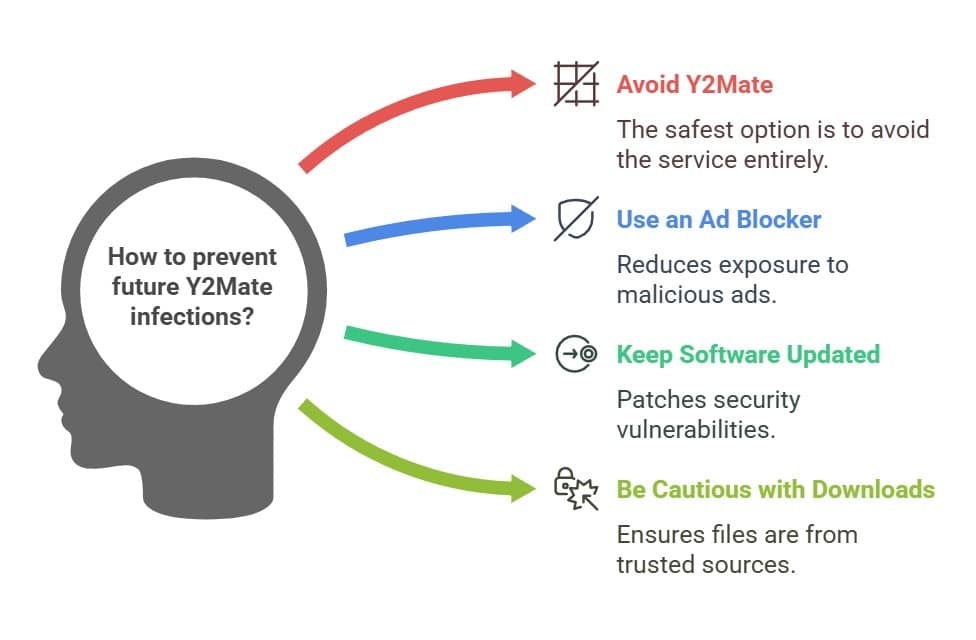
- Install a Premium Ad Blocker: Run a reliable ad-blocking extension like uBlock Origin before opening the site. This will suppress the majority of malicious redirects and pop-ups.
- Never Grant Notification Permissions: If a popup says “Click Allow to prove you are not a robot,” close the tab immediately.
- Double-Check the File Extension: Real video downloads will end in
.mp4or.mkv, and audio will end in.mp3. If the file you download ends in.exe,.dmg,.bat, or.msi, do not open it. Delete it immediately. - Use a VPN: A Virtual Private Network masks your real IP address, keeping your location and data private from intrusive tracker networks.
- Keep Your Antivirus Active: Ensure you have reputable, real-time antivirus software running to catch any sneaky downloads before they execute.
How to Remove the “Y2Mate Virus”
If you have already used Y2Mate and are now noticing strange behavior—like infinite pop-ups, a slow computer, or a hijacked browser homepage—do not panic. Your device isn’t necessarily ruined. Follow these recovery steps:
Step 1: Revoke Notification Permissions
If you accidentally allowed Y2Mate to send notifications, disable them through your browser settings:
- Open Google Chrome and click the three vertical dots in the top-right corner.
- Go to Settings > Privacy and security > Site settings.
- Click on Notifications.
- Look under the “Allowed to send notifications” list, find Y2Mate (or any suspicious domain), click the three dots next to it, and select Remove or Block.
Step 2: Run a Complete Malware Scan
Download a highly rated, trustworthy scanner (such as Malwarebytes or Windows Defender) and perform a deep system scan. Allow the software to quarantine and fully delete any flagged adware or Trojan horse files.
Best (and Safer) Alternatives to Y2Mate in 2026
You don’t have to risk your digital safety just to download a video. Consider these cleaner, safer alternatives:
- YouTube Premium: The easiest, legal, and safest way to download videos directly within the official YouTube app for offline viewing.
- 4K Video Downloader+: A highly respected desktop application. It runs locally on your computer, meaning you do not have to deal with sketchy browser redirection networks.
- yt-dlp: For tech-savvy users, this free, open-source command-line tool is completely ad-free, safe, and incredibly powerful.
- JDownloader 2: Another free, open-source download manager that safely parses video links without displaying malicious adware.
The Verdict: Is Y2Mate Safe 2026?
Ultimately, is y2mate safe 2026? The answer is a definitive no, it is not safe for the average user.
While the conversion tool itself is not explicitly malicious, the predatory ad networks and malware-laden redirect pages it relies on make visiting the site a digital minefield. If you do not have a robust ad blocker, updated antivirus software, and the tech literacy to avoid deceptive download links, you should steer clear of Y2Mate and opt for safer, dedicated software alternatives.
Frequently Asked Questions
1. Will I get a virus just by visiting Y2Mate?
Simply landing on the website is unlikely to infect your system if your browser is fully updated. However, clicking on deceptive links, allowing push notifications, or downloading disguised executable files can instantly compromise your device.
2. Why does my antivirus block Y2Mate?
Most modern antivirus suites and browsers flag Y2Mate because its integrated ad scripts redirect users to known phishing, scam, or malware-distribution networks.
3. Is Y2Mate blocked in my country?
Yes, Y2Mate is blocked by ISPs in several countries, including India, Germany, and the UK, due to copyright infringement rulings. Users in these regions often use a VPN to access it, though doing so still carries the same security risks.
4. What is the safest format to download from Y2Mate?
If you use the site, stick strictly to audio (.mp3) or video (.mp4) formats. Never run or open any file ending in .exe, .dmg, or .msi that you downloaded from a video conversion site.
For more updates visit: MAGAZINE ZILLA
